Have you ever run after a signed authorization form? Or have you ever gone through a bunch of invoices to try to understand the reason behind the unexpected difference in payment? If yes, then you must have experienced the hassle of manual purchasing. The missing signature or missing email will create all sorts of trouble in delivering the order on time.
This is where the purchase order process with ERP comes into play. Rather than handling the requisition, authorization, supplier information, and payment in an isolated manner, the ERP system brings all these processes under one umbrella. It may sound simple; however, the effect it has on daily operations is not so simple.
Earlier, Procurement was seen as a back-office job that had to be completed but did not need much thought. Today, Procurement is more of a strategic operation that influences cash flow, relations with suppliers, and customer satisfaction. Companies that are still doing their procurement using paper face difficulties staying competitive against those firms that have automated the whole process.
Here, Connect ERP comes into play. Developed by Connect Solutions, this platform helps transform the procurement process from initial procurement request to final payment into a predictable and measurable operation. Let’s examine the real purchasing process and see why it becomes so different when implemented via ERP.
What Is the Purchase Order Process?
Definition of a Purchase Order
The purchase order, commonly abbreviated as PO, is a written order sent by the buyer to the supplier regarding what he/she intends to purchase. The purchase order states the number of units, price, date of delivery, and mode of payment, among other things. It may be viewed as an agreement between two parties before exchange of funds.
Why Purchase Orders Matter
There is always going to be a paper trail with purchase orders. This is important because in case there is a dispute over the quantity, price, or date of delivery, there will be something that both parties can refer to. Failure to do this will definitely lead to problems like duplicated orders and unclear invoices.
Manual vs ERP-Based Purchase Order Management
Manual management of purchase orders always involves emails, phone calls, and paper documentation. It is acceptable until the company remains small-scale. As the number of purchase orders increases, the likelihood of errors also grows.
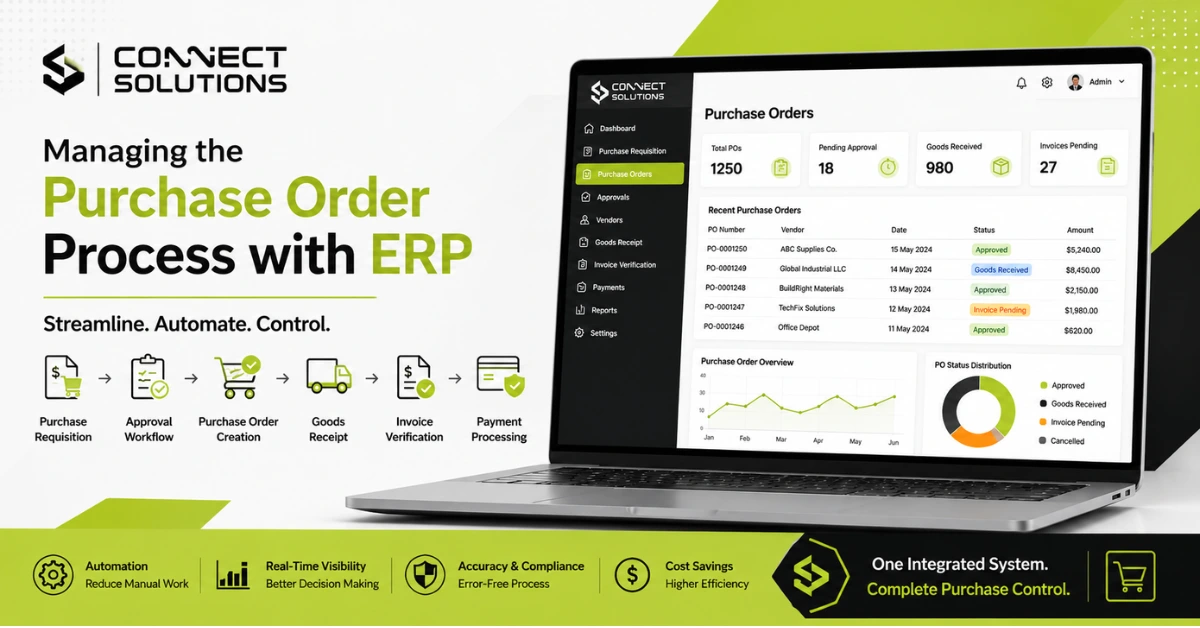
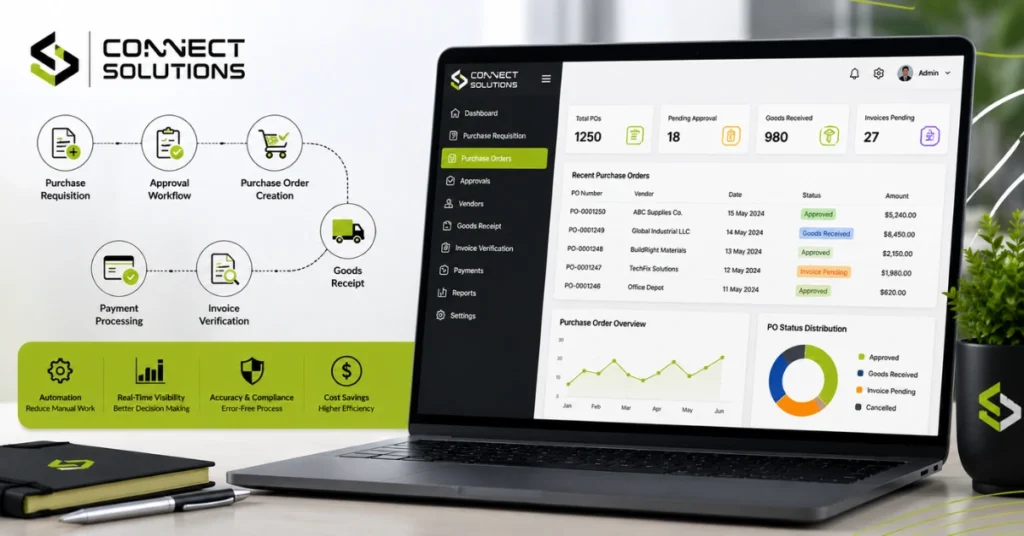
In the case of an ERP-based solution, purchase requisitions are automated, approvals move along the digital chain, and all purchase orders are tracked in real-time. There is no need to wonder about the status of an order or who approved it.
Key Stages of the Purchase Order Process
Whether it’s done on paper or inside a system, most organized procurement follows a fairly similar path.
Purchase Requisition
It starts when an employee raises a purchase request because they need materials, tools, or a service.
Budget Approval
That request then goes through budget approval, just to confirm the money is actually there.
Vendor Selection
From there, the team picks a supplier from the vendor database, weighing price, reliability, and how that vendor has performed in the past.
Request for Quotation (RFQ)
For bigger purchases, an RFQ usually goes out so the team can compare offers from a few different vendors.
Purchase Order Creation
Once a vendor is confirmed, purchase order creation happens, and the deal is put in writing.
Supplier Confirmation
The supplier reviews the order and confirms they can meet the terms.
Goods Receipt
When the items finally arrive, a goods receipt note (GRN) gets generated to record exactly what was delivered.
Invoice Verification
Next, the supplier’s invoice is checked against both the order and the GRN.
Payment Processing
Once everything lines up, payment goes out through accounts payable.
Purchase Record Management
And every document along the way, from the original request to the final payment, gets stored for future reference and audits.
Common Challenges in Manual Purchase Order Management
Manual procurement can seem manageable, right up until order volume starts to climb. A few problems tend to show up again and again:
- Paper-based approvals that get misplaced or forgotten
- Delayed approvals because the one person who signs off is out of office
- Duplicate purchase orders, often created by two departments who didn’t know the other had already ordered
- Budget overruns that nobody notices until it’s too late
- Poor supplier communication, leading to missed deadlines
- Missing purchase records right when an audit comes around
- Lack of procurement visibility across teams
Still managing purchase orders with spreadsheets and paperwork? With Connect ERP, businesses can automate purchase requests, approvals, vendor management, and order tracking, all from a single platform, which means fewer delays and more accurate procurement. Reach out to Connect Solutions at +92 300 1110365 or info@connect-sol.com to see how Connect ERP could fit your business.
How ERP Simplifies the Purchase Order Process
Automated Purchase Requisitions
Employees submit requests directly inside the system, so paper forms drop out of the picture entirely.
Approval Workflows
A clear purchase approval workflow and approval hierarchy send each request to the right person automatically, based on things like amount or department.
Vendor Management
Every supplier’s details, contracts, and communication history sit inside one vendor database, which makes supplier management a lot less chaotic.
Purchase Order Generation
Purchase order creation happens automatically once a request is approved, with vendor pricing and terms pulled in on their own.
Inventory Integration
ERP links purchasing directly to stock levels, so inventory replenishment kicks in before anything actually runs out.
Invoice Matching
Three-way matching compares the purchase order, the GRN, and the invoice, flagging anything that doesn’t line up before payment goes out.
Procurement Reporting
A procurement dashboard gives managers a live view of spending, pending approvals, and order status tracking, all in one place.
Benefits of ERP Purchase Order Management
- Faster approvals with far fewer bottlenecks
- Less manual data entry
- Stronger supplier relationships, built on consistent communication
- Real-time supply chain visibility
- Better inventory planning
- Tighter spending control
- Stronger procurement compliance
- More accurate, exportable procurement reporting
Essential Features of ERP Purchase Order Software
If you’re evaluating ERP procurement software, these are the capabilities worth looking for:
- Purchase requisition management
- Purchase order automation
- Approval workflows
- Vendor management tools
- RFQ management
- Inventory integration
- Invoice matching
- A procurement analytics dashboard
- Mobile access for approvals on the go
- A complete audit trail
Industries That Benefit from ERP Procurement
ERP-driven procurement isn’t tied to just one type of business. It shows up across:
- Manufacturing
- Construction
- Retail
- Wholesale
- Healthcare
- Pharmaceuticals
- Food & Beverage
- Distribution
- Textile
- Engineering
Each of these industries deals with recurring purchases, supplier coordination, and inventory pressure, which is precisely the kind of work ERP procurement automation was built to handle.
Best Practices for Managing Purchase Orders with ERP
- Having the system is one thing, but using it well is what actually moves the needle.
- Standardize procurement workflows across departments
- Set clear approval levels for different spending amounts
- Keep the vendor database current and accurate
- Automate recurring purchases wherever it makes sense
- Keep an eye on procurement KPIs regularly
- Review supplier performance every quarter or so
- Lean on real-time reporting instead of waiting for month-end numbers
Why Businesses in Pakistan Choose Connect ERP
Companies across Lahore, Karachi, Islamabad, Faisalabad, Sialkot, and Gujranwala are moving away from manual purchasing, and a good number of them are landing on Connect ERP for a few practical reasons.
It’s cloud-based, so approvals can happen from anywhere. It’s built around local business needs, with support that actually understands how procurement plays out in Pakistan. And it scales comfortably, whether you’re a small trading business or a manufacturer growing fast, connecting procurement with inventory and finance so nothing operates on its own island.
Ready to bring some order to your procurement process? Reach out to Connect Solutions at +92 300 1110365 or info@connect-sol.com to see how Connect ERP could fit your business.
Conclusion
Managing purchase orders manually can work fine while a business is small, but it turns into a real liability as things grow. Delayed approvals, duplicate orders, and missing records aren’t just annoying, they cost real money and chip away at supplier trust over time.
Bringing the whole procurement lifecycle into one ERP platform, from that first purchase requisition through to invoice matching, gives a business the visibility and control it needs to grow with a bit more confidence. If you’re still leaning on spreadsheets and paper trails, it might just be time to see what digital procurement can do for you.
FAQs
What is the purchase order process in ERP?
It’s the full journey from raising a purchase request to receiving the goods and processing payment, all handled digitally in one system instead of scattered across paperwork.
How does ERP improve purchase order management?
It automates approvals, tracks order status as it changes, matches invoices on its own, and gives managers a real-time view into every purchase.
What is the difference between a purchase requisition and a purchase order?
A purchase requisition is really just an internal request to buy something. A purchase order is the formal document that goes out to the supplier once that request gets approved.
Why is purchase order automation important?
Because it cuts down on manual errors, speeds up approvals, and helps avoid things like duplicate orders or budget checks that get missed.
How does an ERP system streamline procurement?
By tying requisitions, approvals, vendor data, inventory, and invoicing together into one workflow, instead of leaving them as separate, disconnected steps.
What are the steps in the purchase order process?
Requisition, budget approval, vendor selection, RFQ, order creation, supplier confirmation, goods receipt, invoice verification, and finally payment.
What is three-way matching in procurement?
It’s the process of comparing the purchase order, the goods receipt note, and the supplier’s invoice against each other before any payment is released, so mismatches get caught early.
How does ERP help manage suppliers?
It keeps everything about a supplier, contracts, past orders, performance history, in one centralized database, which makes supplier management far more organized than juggling separate files.
What are the benefits of digital purchase orders?
Faster processing, fewer errors, better tracking, and a clean audit trail, compared to the usual mess of paper-based purchasing.
Can ERP automate purchase approvals?
Yes. ERP systems can route requests through a defined approval hierarchy on their own, based on rules like the amount involved or which department is asking.
How does ERP reduce procurement errors?
By cutting out manual data entry and automatically cross-checking orders, receipts, and invoices before any payment goes out the door.
What industries benefit from ERP procurement software?
Manufacturing, construction, retail, healthcare, distribution, and quite a few other industries that deal with regular purchasing and inventory management.
How does ERP improve inventory and purchasing?
It ties stock levels directly to procurement, so replenishment gets triggered automatically once inventory starts running low.
What features should purchase order software include?
Requisition management, approval workflows, vendor management, invoice matching, reporting dashboards, and mobile access, at minimum.
Which ERP is best for procurement management?
It really depends on the size of the business and where it’s located. For companies in Pakistan looking for local support and a smooth onboarding process, Connect ERP by Connect Solutions is well worth a look.